IUP D2L Help Desk Infographic
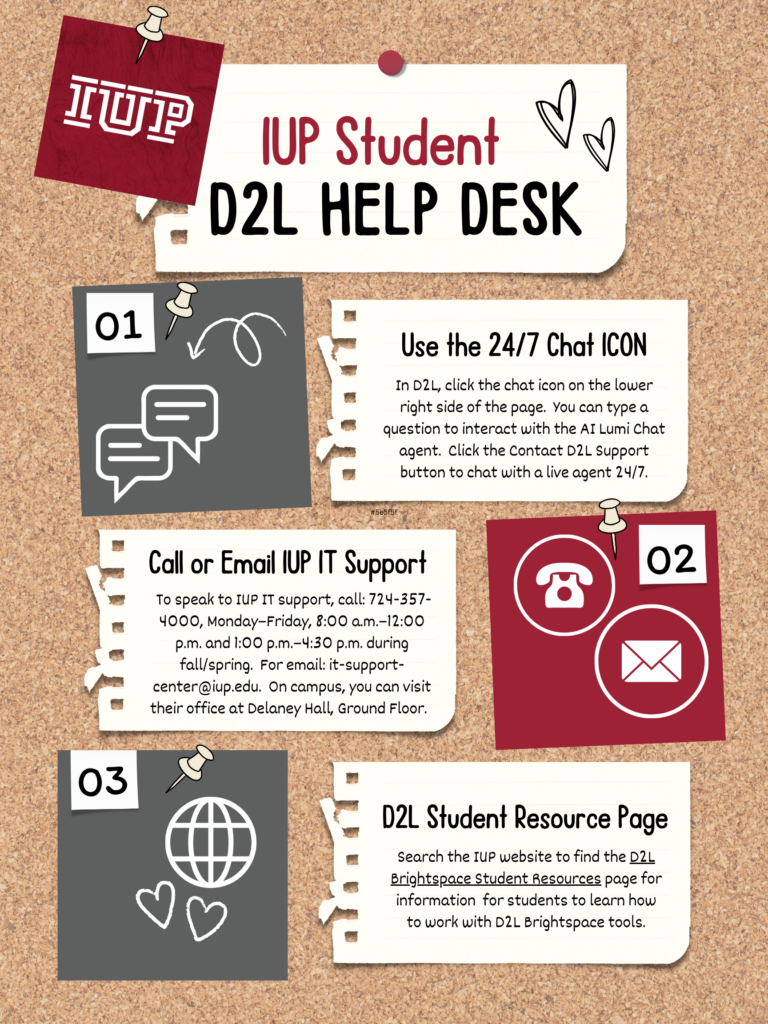
IUP Student D2L Help Desk Infographic
Overview
This infographic was designed to provide students at Indiana University of Pennsylvania (IUP) with quick, accessible support options for navigating the D2L Brightspace learning platform. The goal was to create a visually engaging resource that students could reference without feeling overwhelmed, especially during moments of frustration or confusion.
The Problem
Students frequently struggle to find help when using D2L, especially outside of regular support hours. Many are unaware of available resources or unsure which option to choose.
This leads to:
- Delays in completing coursework
- Increased frustration and anxiety
- Over-reliance on instructors for technical support
Clear, centralized guidance was needed.
The Solution
I designed a student-friendly infographic that highlights three simple ways to get help:
- 24/7 Chat Support
- Call or Email IT Support
- D2L Student Resource Page
The design emphasizes:
- Clarity over complexity
- Step-by-step guidance
- Multiple access points for support
Design Approach
Audience
- Undergraduate and graduate students
- Varying levels of tech confidence
- Likely accessing help under time pressure
Visual Strategy
- Corkboard theme to create a familiar, approachable feel
- Pinned notes layout to break information into digestible chunks
- High contrast school colors (red, black, white) for readability
- Icons + numbering system to guide navigation
Instructional Design Thinking
This infographic follows key microlearning principles:
- Chunked information (3 clear options)
- Immediate usability
- Minimal cognitive load
Providing multiple support channels aligns with best practices for learner autonomy and accessibility.
Content Highlights
- Clear instructions for accessing D2L chat support directly within the platform
- Direct contact information for IUP IT Support
- Guidance to find self-service learning resources
Students can quickly choose the option that best fits their situation.
Tools Used
- Canva (layout and design)
- Icon libraries for visual cues
- Institutional branding elements
Impact / Reflection
This infographic simplifies what is often a frustrating experience, getting technical help, into a clear, approachable process. By combining visual design with instructional clarity, it supports:
- Faster problem resolution
- Increased student independence
- Reduced support confusion